Gym Attendance Tracker: Apps, Kiosk, QR and PIN, What Works in India
By Abhishek Upadhyay11 min read
Updated
A gym attendance tracker is the tool at your front door that records who came, when they arrived and how long they stayed. It can be an app on the member's phone, a tablet kiosk at the desk, a QR code, a PIN pad, a fingerprint device, or a staff member tapping a name on a screen.
This guide is practical and tool-focused. It shows how a tracker works at the desk, the types you can choose from, what each costs in ₹, and how to set one up in a day. Two other guides cover the rest: our gym attendance tracking guide explains the methods and reports, and our comparison of gym attendance tracking software helps you choose a vendor.
How a gym attendance tracker works
Every tracker, cheap or expensive, follows the same six steps.
- Member arrives at the gym.
- Checks in with a phone, a PIN, a QR code, a fingerprint, or by giving their name at the desk.
- Plan is checked. The tracker looks up the member and their plan expiry.
- Visit is saved with the date, time and branch.
- Checks out when leaving, so the tracker knows who is still inside.
- Daily report shows who came, who did not, and when the gym was busy.
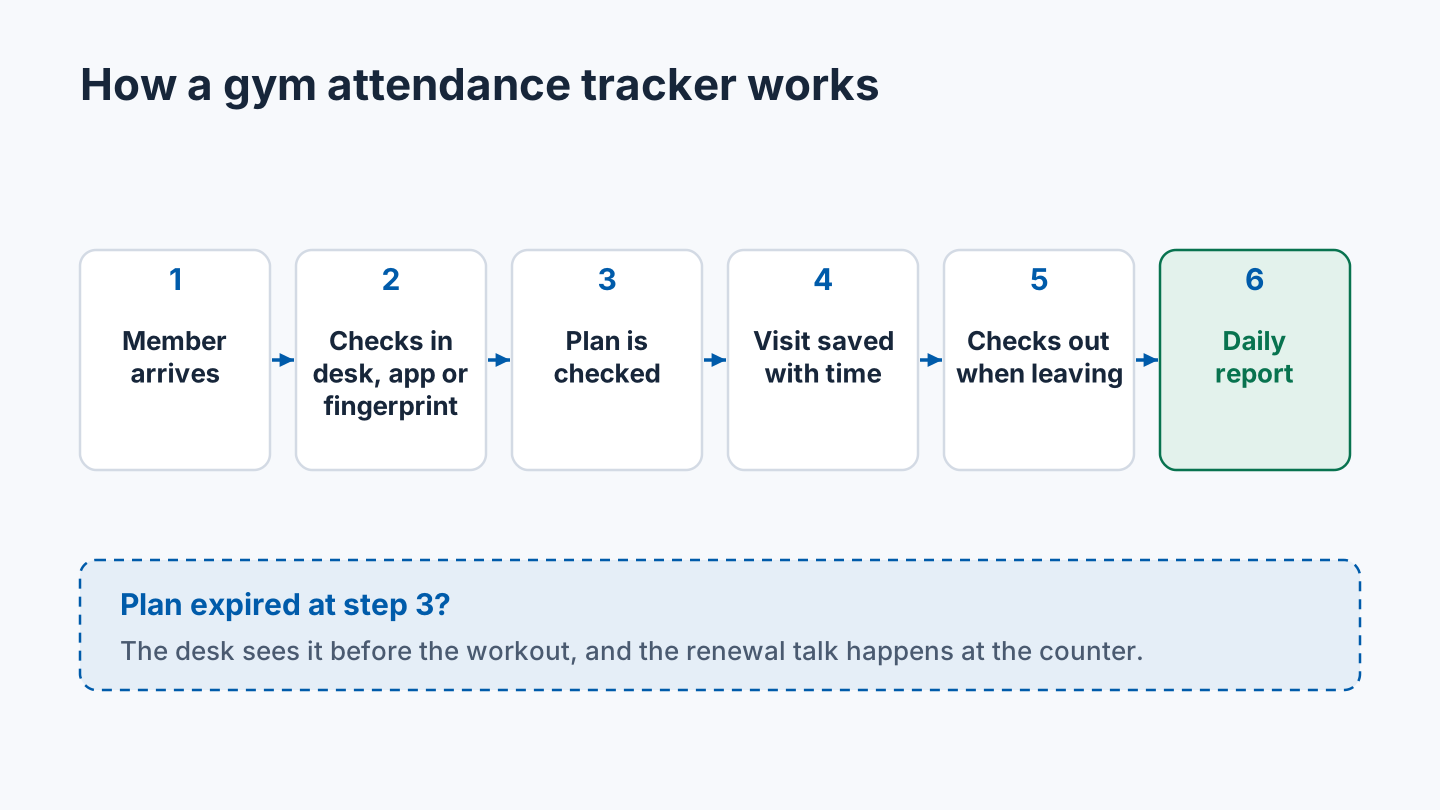
Step 3 is the one that saves money. If the plan has expired, the desk sees it before the workout, and the renewal talk happens at the counter, not over the phone a week later.
Types of gym attendance tracker
Kiosk or tablet at the front desk
A tablet or old phone stands at the entrance. Members tap their name, type a short PIN, or scan a QR code. Most kiosk trackers run in a web browser, so any tablet works. One gym software guide lists four ways to check in at its kiosk: name search, a number code, a QR scan and a barcode card.
- Pros: cheap, fast, little staff time.
- Cons: needs internet and someone to keep the tablet charged; a PIN can be shared.
- Suits: busy single gyms that want self check-in without hardware.

Mobile app check-in
The member opens the gym's app and taps check-in. Some apps use the phone's location, so the check-in only works inside the gym's area.
- Pros: nothing to buy; members see their own visit history.
- Cons: every member needs a smartphone and the app; older members may need help.
- Suits: small and mid-size gyms with younger members.
QR code
The member shows a QR code from their app, or scans a QR code stuck at the door.
- Pros: quick; a scanner or tablet is cheap.
- Cons: a screenshot of a code can be shared with a friend.
- Suits: budget gyms where proxy entry is not a big worry.
PIN or name search
The member types a 4 to 6 digit PIN, or finds their name on a list.
- Pros: no phone needed; easy for every age group.
- Cons: PINs get shared; name lists show other members' names.
- Suits: studios and small gyms where staff know most faces.
Fingerprint or face device
A biometric device at the door reads a fingerprint or face. With a door lock, it can open the door for active members only.
- Pros: stops proxy entry; works without desk staff.
- Cons: costs more; needs installation, a door lock and power.
- Suits: 24/7 gyms, busy gyms and gyms with proxy problems.
Manual entry by staff
Staff tap the member's name on a phone, tablet or computer at the desk. Some studios use roll call: a coach ticks names for a class.
- Pros: zero hardware; staff see every member.
- Cons: the desk gets slow at peak hour.
- Suits: small gyms and personal training studios.

Tracker types compared
| Tracker type | Cost in ₹ | Hardware needed | Stops proxy entry? | Best for |
|---|---|---|---|---|
| Kiosk or tablet | A tablet you own, or ₹500-₹1,000 for a scanner or stand (one vendor's range) | Tablet or phone | No | Busy single gyms |
| Mobile app | ₹0 extra if included in your software | None | Partly | Small and mid-size gyms |
| QR code | ₹500-₹1,000 for a scanner or tablet (one vendor's range) | Scanner or tablet | No | Budget gyms |
| PIN or name search | ₹0 extra | Tablet or keypad | No | Studios |
| Fingerprint device | About ₹7,000-₹8,000, plus lock and installation | Device, lock, computer | Yes | Busy and 24/7 gyms |
| Manual entry by staff | ₹0 extra | Phone or PC at the desk | Yes, staff see faces | Small gyms and PT studios |
Tracker vs software vs register
| Paper register | Tracker on its own | Gym management software | |
|---|---|---|---|
| What it does | Names and times on paper | Records check-ins and check-outs | Records visits next to plans, fees and renewals |
| Cost | Almost nothing | ₹0 to a few hundred ₹ a month | About ₹250 to a few thousand ₹ a month |
| Live count of people inside | No | Yes | Yes |
| Knows if a plan expired | No | Only if linked to plans | Yes |
| What it cannot do | Search, reports, alerts | Fees, renewals, leads | Replace a person who follows up |
A standalone tracker, like a free staff time-clock app, records check-ins well. But it does not know when a member's plan ends. For a gym, the tracker is most useful when it sits inside the software that holds your memberships.
What to look for in a gym attendance tracker
- Hardware: can you start with a phone or tablet you already own?
- Internet: what happens when it drops? Does it keep check-ins and sync later?
- Expired-member alert at the moment of check-in.
- Check-out: does it record exits, or only entries?
- Daily report you can read in one minute.
- Export to Excel, free, whenever you ask.
- Multi-branch: one login, a tracker at each branch, and branch-wise reports.
- Duplicate check-ins: a member who taps twice should count once.
Free gym attendance trackers: what free really means
Free trackers exist, and they are worth knowing about.
- One Indian gym software has a free forever plan for up to 50 members, with attendance tracking included.
- One time-tracking app offers a free gym attendance app for unlimited users, with kiosk check-in by QR, PIN, RFID and face. It is built for staff hours, so check how it handles member plans.
- Other free plans from Indian vendors stop at 50 or 100 members, or after 3 months.
Before you choose a free tracker, ask three things:
- Free for how many members? Most free plans stop at 50 or 100.
- Free for how long? A free trial is not a free plan.
- What is missing? Free plans often leave out biometric support, WhatsApp reminders, branches and export.
For comparison, one Australian studio tool starts at A$89 a month for up to 50 members. Indian tools are much cheaper, and several start free. Our guide to free gym management software has more detail.
How to set up a gym attendance tracker in 1 day
You can start tracking attendance tomorrow morning with a phone or tablet at the desk.
- Morning: load your members. Add names, phone numbers, plans and expiry dates. If they are in Excel, import them. Fix duplicate names now.
- Choose the check-in method. Start simple: staff check-in at the desk, plus app check-in for members who want it.
- Set up the desk. Put a charged phone or tablet at the counter, logged in for staff.
- Train staff in 15 minutes. Show check-in, check-out, and what to do when a plan has expired.
- Tell members. A WhatsApp message and a sign at the door: "Please check in and check out at the desk."
- Evening: check the first report. At closing, check out anyone still showing inside, then read the day's list.
After a week, look at your busiest hours. After a month, look at who has stopped coming. If the desk is too slow at 7 PM, that is when to consider a fingerprint device. The biometric attendance page explains what that setup needs.
How Zenvore works as a gym attendance tracker
Zenvore is gym management software for gyms in India, so its tracker sits next to your memberships. Here is the real flow:
- At the desk: staff check a member in from the Zenvore web console, and check them out when they leave. Every plan.
- On the member's phone: members check in from the Zenvore Android app with geo-fence check-in. It only works inside the gym's area. Every plan.
- At the door: on Growth (₹1,890/month) and Chain (₹3,490/month), Zenvore works with Identix fingerprint devices for automatic attendance and door lock. The device is bought separately.
- Today's view: who is in the gym right now, plus per-member history.
- Every branch in one account, on every plan.
Zenvore does not offer a QR or PIN kiosk. Members use their own phone, staff use the desk, or the fingerprint device does it. Plans start at ₹990 a month on the pricing page. Learn more about Zenvore or the gym attendance system.
Frequently asked questions
What is a gym attendance tracker?
A gym attendance tracker is the tool that records each member visit: who came, when they checked in and when they left. It can be a phone app, a tablet kiosk, a QR code, a PIN, a fingerprint device or staff entry at the desk.
How does a gym attendance tracker work?
The member checks in with a phone, PIN, QR code, fingerprint or at the desk. The tracker finds the member, checks the plan, saves the visit with the time, and records the check-out. At the end of the day, it shows a report of who came.
Is there a free gym attendance tracker app?
Yes. Some Indian gym software has free plans for up to 50 or 100 members, and some time-tracking apps are free for unlimited users. Check the member limit, how long it stays free, and whether it knows when a plan expires.
Do I need hardware for a gym tracker?
No. You can track attendance with a phone or tablet at the desk, or with members checking in from an app. Hardware like a fingerprint device is only needed if you want automatic entry, a door lock, or to stop members sharing access.
Can I track attendance with just a phone?
Yes. Staff can check members in and out from a phone at the desk, and members can check in from their own phones. On Zenvore, both are included on every plan from ₹990 a month.
What is the difference between a gym tracker and gym software?
A tracker records visits. Gym software records visits next to each member's plan, fees and renewal date, so it can warn you when an expired member checks in. Most gym software includes a tracker.
Which gym attendance tracker is best for a small gym?
For a small gym, a phone at the desk plus app check-in is usually enough. It costs nothing extra and needs no installation. Add a fingerprint device later if the desk gets slow at peak hours.
See how memberships, attendance and collections work together in Zenvore’s gym management software india.