How to manage multiple gym branches without losing control
By Abhishek Upadhyay6 min read
Updated
Opening a second gym changes the owner's job. You need to know what is happening at each location without spending the day asking managers for updates. A useful starting point is a shared operating routine: record the same information, assign clear responsibilities and review each branch using the same definitions.
This guide covers the records and habits that help a growing gym business stay organised, whether you are preparing to open another location or already managing several.
1. Set a common routine before adding another location
Write down how your team handles a new enquiry, a trial visit, a membership sale, a check-in and a renewal. Agree on the minimum information staff need to record at each step. A member's plan, start date, expiry date and payment status should mean the same thing at every desk.
Standardise the process while leaving room for legitimate local differences. Branches may have different opening hours, facilities or prices. Record those differences explicitly so staff can explain them to members.
If you are choosing a system for the first time, the gym management software buyer's guide covers the questions to ask before committing.
2. Keep branch records clear
A combined member count is useful for understanding the size of your business. Daily work still needs branch context. Your team should be able to identify where a membership belongs, which staff member owns a follow-up and where a payment was recorded.
Decide how cross-branch access works before selling it. Can a member train at every location, or only at their home gym? How will another branch check eligibility? Write the policy into your membership terms and confirm that your chosen software supports the way you intend to operate.
When moving records from spreadsheets, review duplicates and missing expiry dates before importing. Start with one branch, reconcile its active memberships and payments, then repeat the process for the others.
3. Give staff access that matches their responsibilities
Owners, branch managers, trainers and front-desk staff need different information. Set access by responsibility and location, then check what each role can actually see and change. Use individual staff accounts so a shift change does not mean sharing the same login.
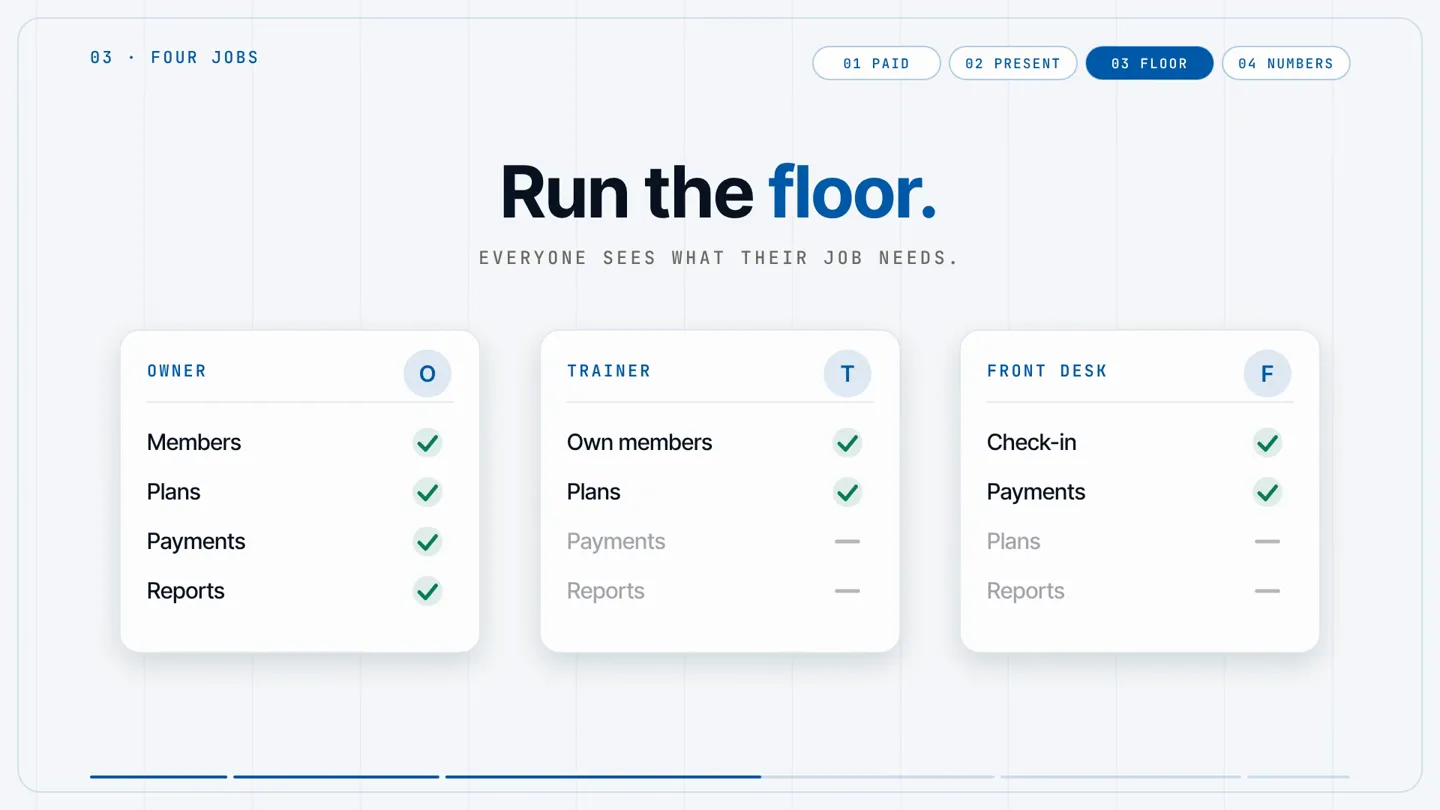
Review access when someone changes branches or leaves the business. A short checklist helps: update their branch assignment, remove access they no longer need and hand over any open member follow-ups.
Ask for a role-by-role walkthrough during a software demo. Test a routine task with each role rather than judging permissions only from an owner's account.
4. Compare collections using the same rules
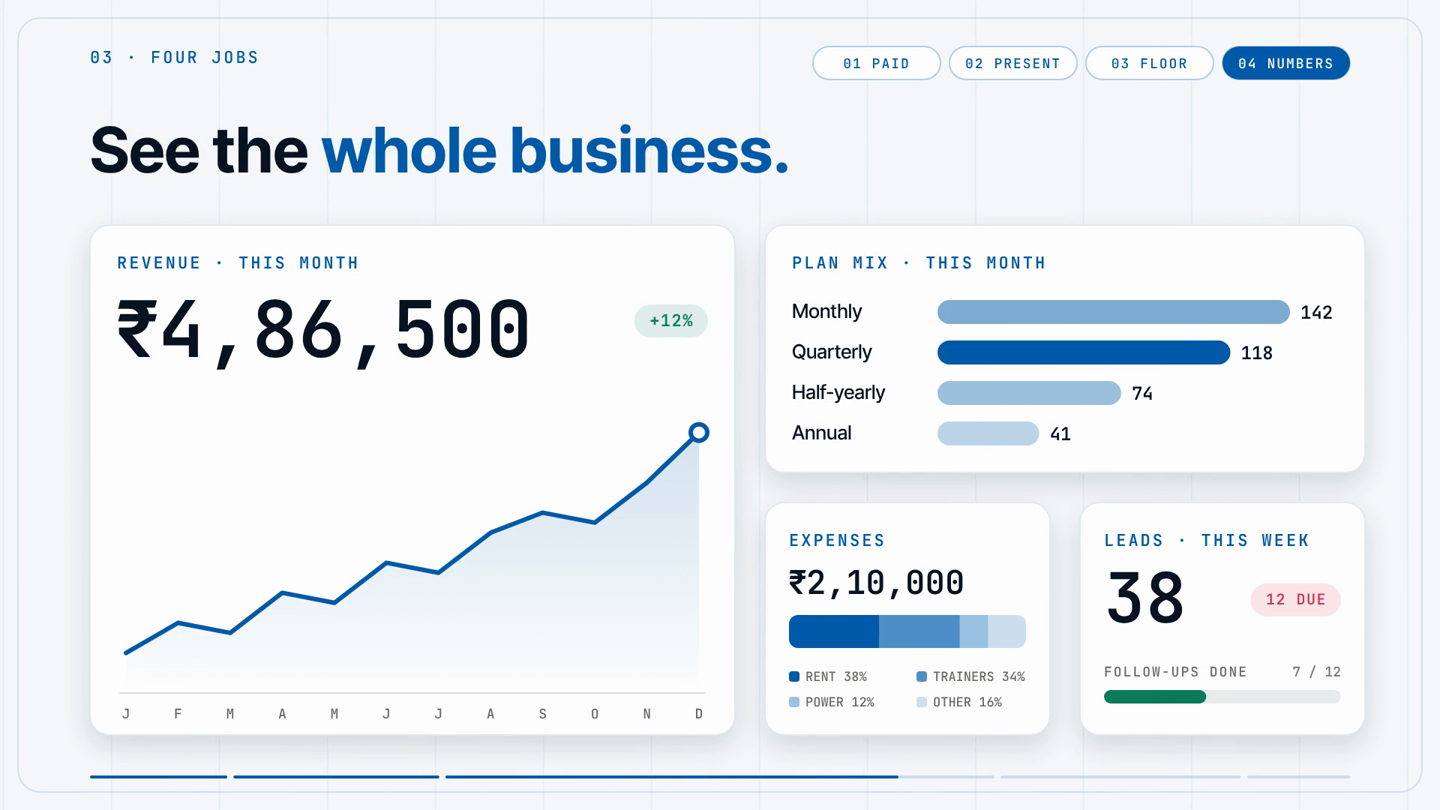
A branch that sells more memberships does not necessarily collect more cash in the same period. Separate sales, payments received, outstanding balances, refunds and expenses. Decide which date each report uses, and keep that rule consistent when comparing locations.
For example, a quarterly membership paid in full this week and a monthly membership with an unpaid balance should not be treated as equivalent collections. Keep the underlying payment records available so the team can explain a difference in the totals.
Use the gym billing guide to review the records behind your collection process. For a planning exercise, the gym profit calculator can help you compare income and costs using your own assumptions.
5. Review attendance and renewals together
Attendance tells your team who is using the gym. Expiry dates tell them when a membership decision is approaching. Reviewing both helps a manager choose a useful next conversation: a member who has stopped visiting may need support with their training before they want to discuss renewal.
Give each follow-up an owner and a next action. Keep notes clear enough that another staff member can pick up the conversation after a shift change. Compare renewal rates for memberships expiring in the same period, using the same counting rule at every branch.
The practical guide to increasing gym renewals explains how to build that routine and measure it without confusing renewal rate with total active membership.
6. Run a short weekly branch review
Ask each manager to prepare the same small set of records before the meeting. Focus on exceptions that need a decision rather than reading every number aloud.
- Memberships: active members, upcoming expiries and unresolved record issues.
- Collections: payments received, outstanding balances and refunds needing review.
- Attendance: members who have stopped visiting and follow-ups assigned to staff.
- Enquiries: trials booked, open follow-ups and the next action for each lead.
- Operations: staffing gaps, equipment issues and member complaints that need an owner.
Close the meeting with a named person and a due date for each action. At the next review, check those actions before adding new ones. This makes the meeting useful to managers as well as the owner.
What to check when choosing multi-branch software
For a gym SaaS subscription, confirm whether allowances apply per location or across the account. In Zenvore, branches are unlimited and member and staff allowances are pooled; Chain adds the multi-branch dashboard and branch P&L.
Look beyond the number of locations a plan allows. Ask how active member and staff limits are counted, how branch access works, and whether the reports answer your daily questions. Bring a real example from your gym and ask the vendor to walk through it.
Zenvore's multi-branch gym management software supports unlimited branches on every plan, with active member and staff allowances shared across your account. Branch records and staff access help your team work from the information relevant to their location and role.
For example, a plan with a 500-active-member allowance can cover several branches whose combined active membership stays within that allowance. Check the current limits and costs on the pricing page before deciding which plan fits your business.
Explore multi location gym management software to review pooled member capacity, branch permissions and Chain reporting in one account. If your branches operate as a franchise, the gym franchise management software page explains how roles, branch access and pooled allowances fit that model, and the franchise operations checklist turns this routine into a standard for every branch.
See how memberships, attendance and collections work together in Zenvore’s gym management software india.